
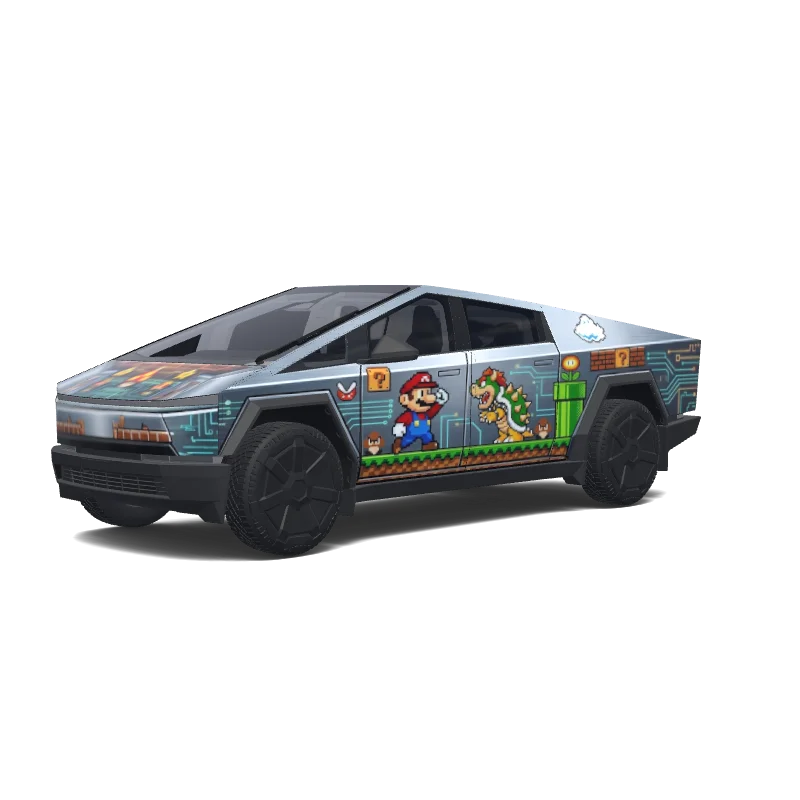
马里奥特斯拉车衣.
“马里奥特斯拉车衣.”

Free preview here: 512 px, watermarked. 5 credits unlock the clean 1024 px PNG for Paint Shop.See credit packs
Community gallery design · creator credit preserved.
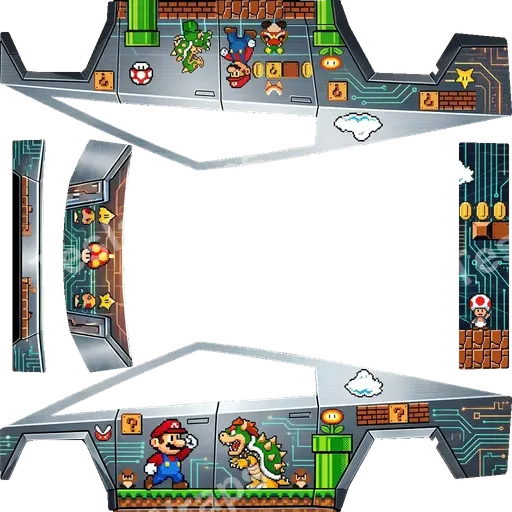
The wrap PNG you download
The watermarked preview on this page is 512 px wide — enough to judge the design, not enough for Paint Shop. Exporting with 5 credits releases the clean 1024 px source with no watermark, ready for a USB stick or the Tesla app.
The design covers the full body, so every panel of your Cybertruck is mapped. The paid export is the original file the author uploaded, at full resolution.
About this design
马里奥特斯拉车衣. is a custom wrap design for the Tesla Cybertruck, ready to upload with the Tesla App or apply through Tesla Toybox Paint Shop with USB. Download it as a 1024×1024 PNG in the format Paint Shop expects for 5 credits. So far it has earned 23 downloads and 1 likes from the community.
How to install on Tesla Paint Shop
- 1Download the wrap PNG. Download this wrap as a 1024×1024 PNG file no larger than 1 MB.
- 2Upload with the Tesla App. In Tesla App v4.59.0 or later, open Creations → Wrap → Upload and select the PNG.
- 3Or use a USB drive. Copy the PNG into a root-level Wraps folder on a FAT32 or exFAT drive, then connect it to the car.
- 4Apply it in Paint Shop. Open Toybox → Paint Shop → Wraps, select the custom wrap, and preview it on the 3D model.
Frequently asked questions
How many credits does this wrap download cost?
Each PNG download costs 5 credits after you sign in.
What file format and size does it use?
It downloads as a 1024×1024 pixel PNG no larger than 1 MB. Tesla accepts PNGs from 512×512 through 1024×1024 pixels.
How do I install this wrap?
Download the PNG, then use Tesla App v4.59.0 or later at Creations → Wrap → Upload. As a USB fallback, put it in a root-level Wraps folder.
Can I customize this design before using it?
Yes. Open it in the browser wrap editor to change colors, add text or images, then export your own PNG for 5 credits.